Meet your accountable AI sidekick

Every hero needs a sidekick.

Use it like chat. Trust it like a workspace. Clarity Sidekick helps you capture life and work as it happens, organize the mental load, remember important context, and prepare your next move.

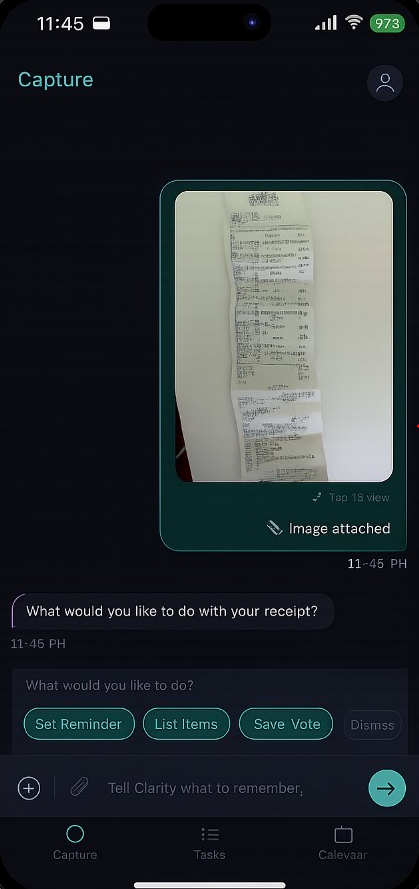
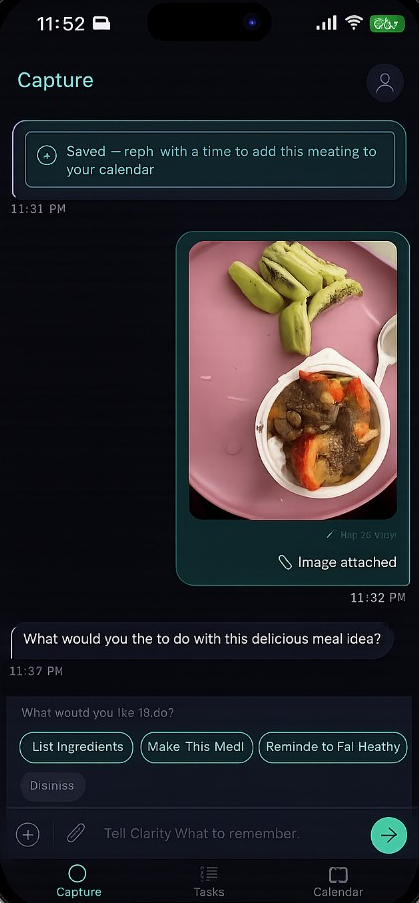
Chat like you would with any AI, then go further. Capture notes, tasks, screenshots, receipts, documents, and ideas. Teach Clarity what matters, track what is still open, and let your Sidekick connect the dots across your app and web workspace.

See How It Works

Early access openBuilt for the mental load of real life

Life gets scattered fast.

Tabs multiply.

Screenshots disappear.

Open loops pile up.

Work, projects, reminders, receipts, ideas, and conversations end up everywhere.

Your Sidekick helps pull them back into one calm place.

How it works

How Clarity Sidekick turns scattered into clear

No jargon. No complicated setup. Just a calmer way to capture what matters, remember the context, and prepare the next step.

CaptureOrganizeRememberPrepareFollow through

Capture

Drop it in

Chat it, type it, snap it, upload it, or say it. Clarity Sidekick captures the scattered stuff before it disappears.

Organize

Clarity connects the dots

Clarity connects the dots across projects, people, and timing — without you rebuilding a system.

Sorted

Notes

  • Call dentist
  • Pantry idea

Files

  • Receipt batch
  • Contract PDF

Reminders

  • Follow up Friday
  • Slack thread

Remember

Important context stays with you

When you return days later, the context is still there. No digging through tabs or camera rolls.

Picked up where you left off

Context saved — no tab archaeology

Renovation thread

Last touched 4 days ago

Thu

Contractor comparison

You left off on pricing

Tue

Receipts batch

2 items still need filing

Mon

Prepare

Know what to do next

See what needs a reply, what can wait, and what’s ready to move — in plain language.

Open items

  • Reply to contractor quoteNeeds reply
  • File receipt under renovationReady
  • Schedule site walkthroughThis week

Follow through

Keep open loops from slipping

Reminders, follow-ups, and small commitments stay visible — so nothing important quietly falls through the cracks.

Open loops

  • Reply to contractor quoteTomorrow
  • Renew insurance reminderNext week
  • Send thank-you noteFriday

The workspace

Calm, organized, and ready when you are

Your day, open loops, and memory — in one trustworthy place. Real product screenshots will live here soon.

Good morning, Zac.

Monday, May 11 · 9:12 AM · Camden, TN

ZB
All systems normal

9:00 AM

Sprint 3 standup

Ready

1:00 PM

Sidekick Beta review

Prep needed

3:30 PM

LinkedIn strategy session

Prep needed

Suggested

SafeBox prototype hasn't moved in 4 days

3 related notes · 1 receipt waiting

Up to date · 124 remembered · 2m ago

Open items

  • Review Sprint 3 open itemsToday
  • Fix webpage issueBlocked
  • Reply to contractor quoteNeeds reply

Inbox

Coming soon

Needs review

4
  • 2 items stuck
  • 2 memory updates to approve
  • 1 decision ready

Recent activity

  • Staff meeting notes

    Imported from Obsidian · 2h ago

  • Receipt capture

    SafeBox · 4h ago

Real life · three ways people use Clarity

Clarity use cases

Real life · Case 1

Fix Something

When something breaks at home, the details scatter fast.

  • Save the part number.
  • Keep the receipt.
  • Remember the video.
  • Know what worked last time.

Oil filter · SKU 1542

Saved from label photo

YouTube · bearing install

Timestamp 4:12 noted

Receipt · hardware store

$47.20 · warranty

Worked last time

Penetrating oil, 20 min soak

Plan Something

Real life · Case 2

Plan Something

Trips and big moments deserve one calm place for the loose ends.

  • Book the trip.
  • Hold the reservation.
  • Track the packing list.
  • Answer the open question.

Flight · Thu 7:40am

Confirmation in email

Dinner reservation

Saturday · still unconfirmed

Packing list

8 of 14 checked

Open question

Museum tickets for Sunday?

Manage Something

Real life · Case 3

Manage Something

Work stays human when follow-ups and decisions don’t live in fifteen tabs.

  • Save the follow-up.
  • Keep the job note.
  • Track the open decision.
  • Know the next action.

Follow up · Rivera

Quote sent Tuesday

Job site notes

Access code · side gate

Open decision

Material lead time · 2 options

Next action

Call supplier before 3pm

Trust and privacy

A quiet promise, built into every interaction.

Your data.

Your style.

Your privacy.

Your Clarity.

  • Approval first

    Nothing happens without your say-so.

    Clarity suggests, drafts, and prepares. You decide what gets saved, sent, or acted on.

  • You stay in control

    Pause, edit, delete, or walk away anytime.

    Your memory, preferences, and workspace stay visible and manageable.

  • Preview before action

    See the plan before anything moves.

    No silent actions. No hidden changes. No surprises.

No surprises. No silent moves. Just clarity.

One Sidekick. Many doors.

Use Clarity your way.

Start with Clarity Sidekick for yourself: chat, capture, memory, open loops, calendar, and a calm workspace for daily life and work. As Clarity grows, the same accountable brain will support mobile, web, API access, business workflows, and team spaces.

  1. Now

    Personal beta

    Chat, capture, memory, open loops, calendar, and workspace.

  2. Next

    Full launch — mobile and mail

    Capture on the go, Gmail follow-ups, reminders, and daily prep.

  3. Builder

    API access

    Connect your own tools to the same governed Clarity memory and logic.

  4. Later

    Business workflows

    Team spaces, approved helper bots, approved workflow helpers, and shared operating context.

You don't have to carry it alone

You're the hero every day. Isn't it time you had a sidekick?

Clarity Sidekick stays by your side, helping you remember what matters, track what's open, and prepare your next move. Organized, personal, and built for real life.

Free to join · Your data stays yours